Tuesday, March 8, 2016

Angular| Filter Data

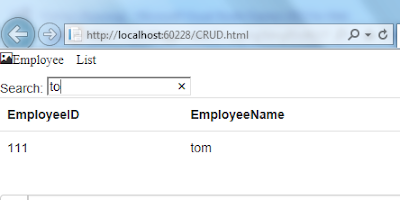
Earlier we saw some of the filter like sorting and formatting the data  we shall now see how to filter data.

you just need 2 thing in addition to your display functionality
a) a search box
b) filter expression in angular
Note: This data is retrieved using WebApi and angular js ajax calls

code for the searchbox is as below

Search: <input type="search" name="EmployeeSearch" ng-model="aa" />

Now I wish to apply the filter to whole table so that it tries to match the criteria with any of the column data available

<tr ng-repeat="Emp in Employee|filter:aa">

<td>

{{Emp.EmployeeID}}

</td>

<td>{{Emp.EmployeeName}}</td>

<td>{{Emp.Email}}</td>

<td>{{Emp.RoleId}}</td>

<td>{{Emp.FunctionID}}</td>

<td>

<span ng-click="editBook(Emp)" class="btn btn-primary">Edit</span>

<span ng-click="deleteBook(Emp)" class="btn btn-danger">Delete</span>

</td>

</tr>
Tuesday, March 1, 2016

Angular JS with WebApi-Get

Earlier we saw how to make ajax calls from JQuery to consume WebApi Services .
the Same is shown here with angular js as a JavaScript framework .

Create a webApi controller and its method to get the data  from Database

public class EmployeeController : ApiController

    {

        private DRMSEntities1 db = new DRMSEntities1();


        // GET api/Employee

        public IQueryable<DRMS_Tbl_Employee> GetDRMS_Tbl_Employee()

        {

            return db.DRMS_Tbl_Employee;

        }
}

Create an HTML page to make ajax calls and display the result on the browser

View


<!DOCTYPE html>

<html xmlns="http://www.w3.org/1999/xhtml" >

<head>

 
//CDN//
    <script src="https://ajax.googleapis.com/ajax/libs/angularjs/1.4.5/angular.js"></script>

    <script src="Scripts/bootstrap.js"></script>

    <link href="Content/bootstrap.css" rel="stylesheet" />

    <title></title>

</head>

<body ng-app="RiskModule">

    <h1>hi {{2+2}}</h1>

    <div ng-controller="RiskDetailsController">

        {{Employee.EmployeeName}}

//binding Json result to table

        <table ng-repeat="Emp in Employee"  class="table table-condensed">

            <tr>

                <td>

                    {{Emp.EmployeeID}}

                </td>

                <td>{{Emp.EmployeeName}}</td>

                <td>{{Emp.Email}}</td>

                <td>{{Emp.RoleId}}</td>

            </tr>

        </table>

        <script >
//Making Ajax calls

            var app = angular.module("RiskModule", []);

            app.controller("RiskDetailsController", function ($scope, $http) {

                $http.get('http://localhost:60228/api/Employee').

                success(function (data, status, header, config) {

                    $scope.Employee = data;

                }).

                error(function (data, status, header, config) {

                    alert("Error");

                });


            });

        </script>

    </div>


</body>


</html>
Run the solution and you will see the result as below


Tuesday, February 16, 2016

Calling Stored Procedures from MVC

Earlier we had discussed on how to use database first approach in MVC 5.
Now I explored and way to use stored proc using database first approach

Ideally have a stored Proc Built in your SQL server


create procedure GetFunctions

As

Begin
       select FunctionId,FunctionName from   tblFunction
End

Now in the Visual Studio we add a new model . we add a edmx file as below
 
 
we now create a new SQL connection
 
Now we will choose a the stored proc we created
you can go to model browser and edit the properties as below
 
GetFunction above is the one which I have defined to call the stored procedure from MVC 
 
Now create controller
public class FuncController : Controller


{
 
//
// GET: /Func/
testdbEntities4 db = new testdbEntities4();
public ActionResult Index()
 
 
{
 
return View(db.GetFunctions());
 
 
}
}
 
Create Views
@model IEnumerable<RiskPOC.Models.Functions>


@{
 
ViewBag.Title = "Index";


}
 
<h2>Index</h2>

<table>

<tr>

<th>


@Html.DisplayNameFor(model => model.First().FunctionName)
 
</th>

</tr>

@foreach (var item in Model)


{
 
<tr>

<td>


@Html.DisplayFor(model=>item.FunctionName)
 
</td>

</tr>


}
 
</table>
 
And finally run the solution 
 
Compare it with Database